| 일 | 월 | 화 | 수 | 목 | 금 | 토 |
|---|---|---|---|---|---|---|
| 1 | 2 | 3 | 4 | |||
| 5 | 6 | 7 | 8 | 9 | 10 | 11 |
| 12 | 13 | 14 | 15 | 16 | 17 | 18 |
| 19 | 20 | 21 | 22 | 23 | 24 | 25 |
| 26 | 27 | 28 | 29 | 30 |
- 멤버함수로구현
- 기본클래스
- C++
- 다형성
- list comprehension
- 주피터
- 연산자오버로딩
- 참조자
- python
- STL
- 점프투파이썬
- 코드잇
- 포인터
- 11382번
- 제네릭프로그래밍
- 스택
- 프로그래머스lv2
- 얕은복사
- OOP
- 인프런
- OpenCV
- 백준
- 데이터사이언스
- 깊은복사
- 코딩테스트
- 유도클래스
- 람다식
- c++코딩테스트합격자되기
- 동적바인딩
- 상속
- Today
- Total
WjExplor Story
다양한 그래프 그려보기 본문
import numpy as np
import matplotlib.pyplot as plt
year_array = np.array([2011, 2012, 2013, 2014, 2015, 2016, 2017, 2018, 2019, 2020])

stock_array = np.array([
    14.46, 19.01, 20.04, 27.59, 26.32,
    28.96, 42.31, 39.44, 73.41, 132.69
])
plt.plot(year_array, stock_array)
plt.show()
다음은 막대그래프에 대해 알아보자
# 반장 선거 데이터
name_array = np.array(['mark','dongwook','kimeun','jeongyun','leetae'])
votes_array = np.array([5,10,6,8,3])
plt.bar(name_array, votes_array)
plt.show()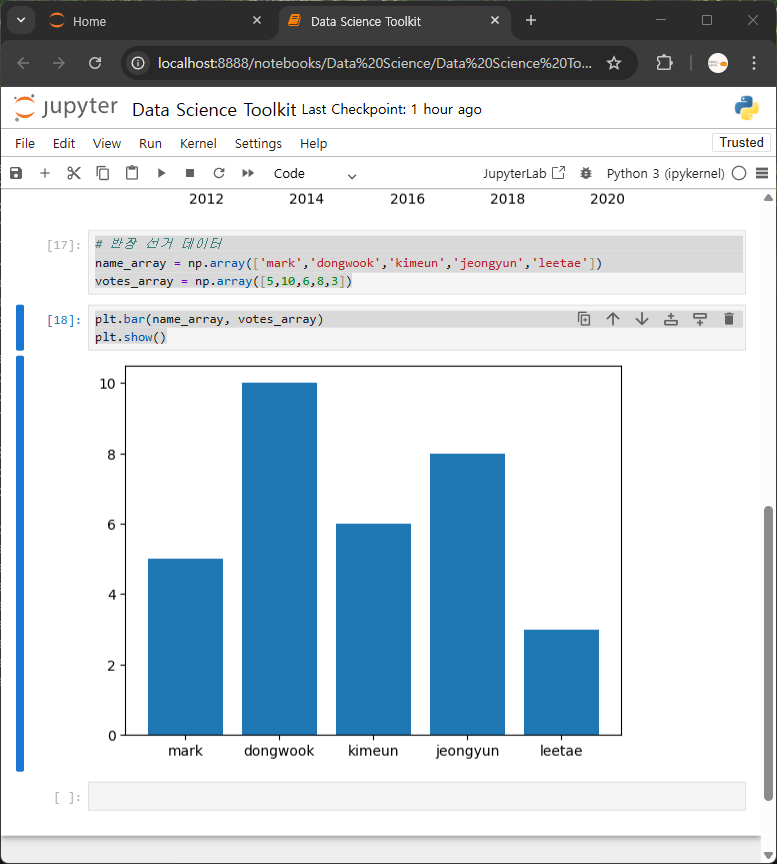
마지막으로 산점도를 알아보자.
height_array = np.array([
    165, 164, 155, 151, 157, 162, 155, 157, 165, 162,
    165, 167, 167, 183, 180, 184, 177, 178, 175, 181,
    172, 173, 169, 172, 177, 178, 185, 186, 190, 187
])

weight_array = np.array([
    62, 59, 57, 55, 60, 58, 51, 56, 68, 64,
    57, 58, 64, 79, 73, 76, 61, 65, 83, 80,
    67, 82, 88, 62, 61, 79, 81, 68, 83, 80
])
plt.scatter(height_array,weight_array)#(x축, y축)
plt.show()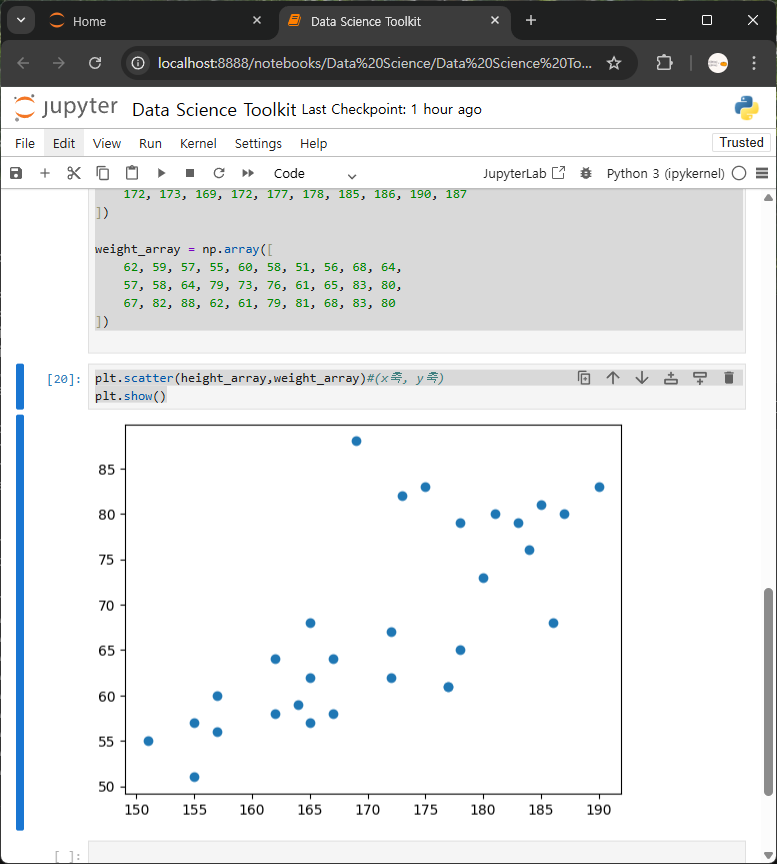
Scatter는 흩뿌리다는 의미이다.
산점도의 목적은 두 변수의 연관성을 파악하는 것이다.
지금 같은 경우는 키와 몸무게가 서로 어떻게 연관되어 있는지 확인한다.
키가 작으면 대체로 몸무게가 적게 나가고 키가 크면 대체로 몸무게가 커지는 걸 알 수 있다.
어떤 변수가 커질 때 다른 변수도 함께 커지거나 아니면 반대로 어떤 변수가 커질 때 다른 변수는 작아지는 패턴이 있다면 두 변수가 상관관계가 있다고 해석할 수 있다.
다른 사람에게 이 그래프를 보여주면 제대로 이해하는 게 불가능하다.
그래프가 나타내는 게 뭘 의미하는 건지 알 수 없고 흩어져 있는 점들(산점도)도 뭘 의미하는지 알 수 없다.
이 자체로는 효과적이지 않는 소통 수단이다.
그래서 처음보는 사람도 이해할 수 있게끔 그래프가 무엇을 의미하는지 적절히 표현해줘야 한다.
plt.scatter(height_array,weight_array)
plt.title('Height and Weight') # 같은 셀에 넣어주어야 한다.
plt.show()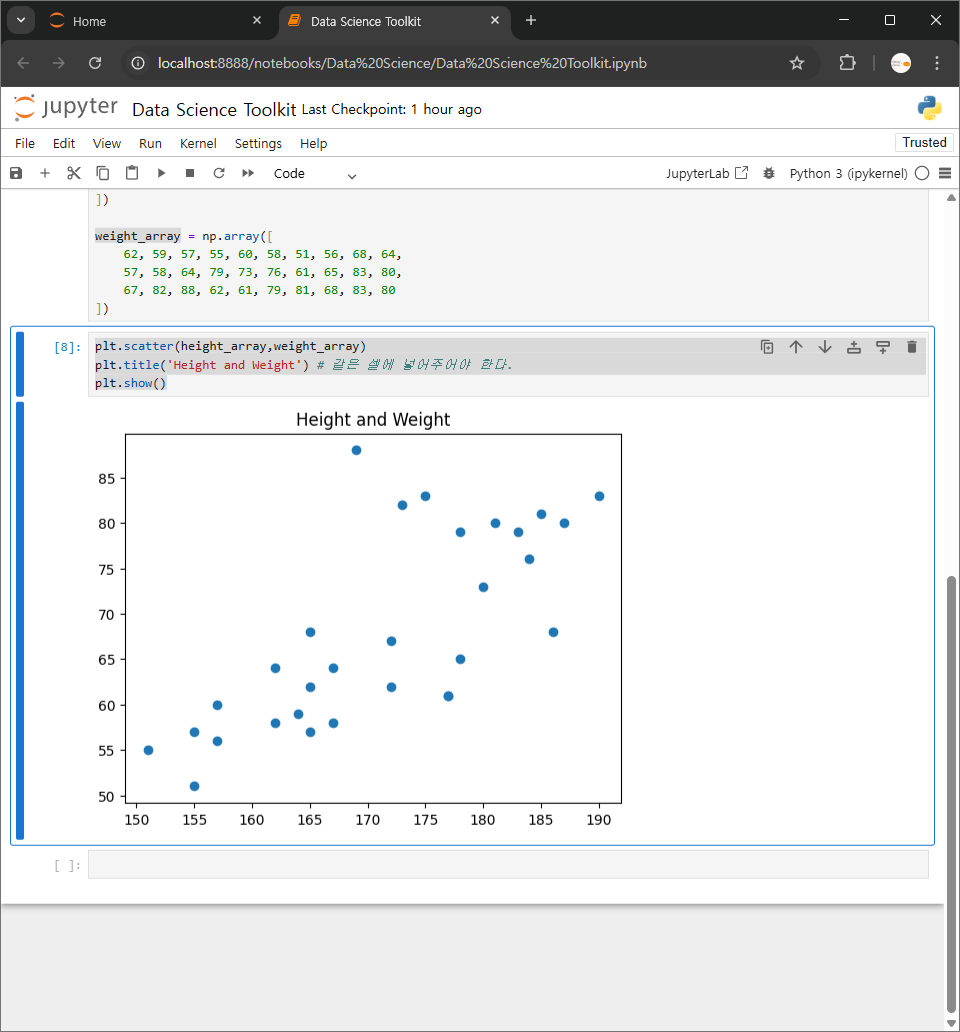
이어서 x 축과 y 축이 각각 어떤 걸 의미하는지도 이 축에 이름을 달아보자.
plt.scatter(height_array,weight_array)
plt.title('Height and Weight')
plt.xlabel('Height (cm)')
plt.ylabel('Weight (kg)')
plt.show()
이제 그래프를 조금 더 꾸며보자.
예를 들어 점들의 색상을 변경해보자.
plt.scatter(height_array,weight_array, c='red' ) # c는 color 의 약어
plt.title('Height and Weight')
plt.xlabel('Height (cm)')
plt.ylabel('Weight (kg)')
plt.show()
plt.scatter(height_array,weight_array, c='#77b9c9' ) # c에 '#HEX 코드' 써도 색상이 변한다
plt.title('Height and Weight')
plt.xlabel('Height (cm)')
plt.ylabel('Weight (kg)')
plt.show()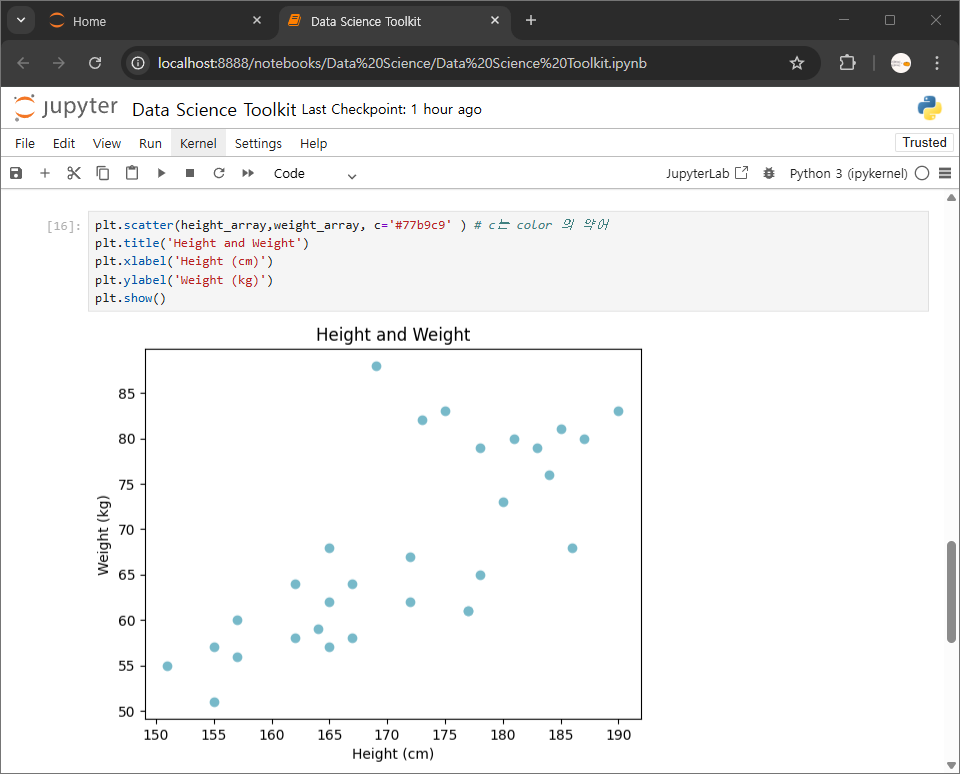
점들의 모양을 바꿀 수 있다.
plt.scatter(height_array,weight_array, c='#77b9c9',marker='+')
plt.title('Height and Weight')
plt.xlabel('Height (cm)')
plt.ylabel('Weight (kg)')
plt.show()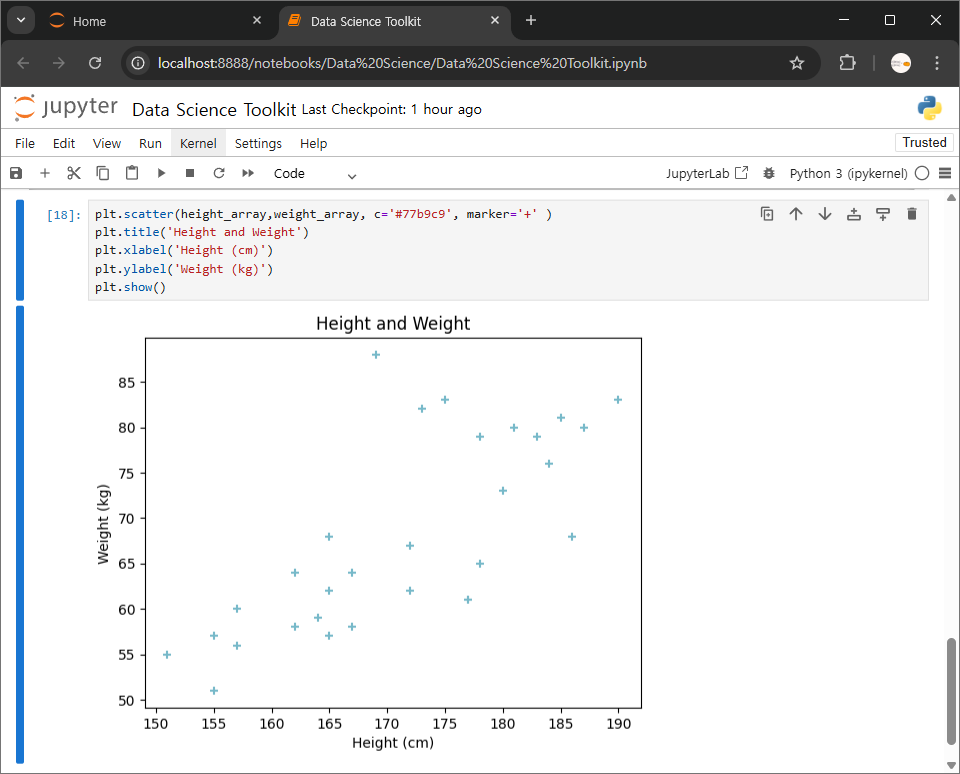
plt.scatter(height_array,weight_array, c='#77b9c9', marker='s' ) # s 는 square 의 약어
plt.title('Height and Weight')
plt.xlabel('Height (cm)')
plt.ylabel('Weight (kg)')
plt.show()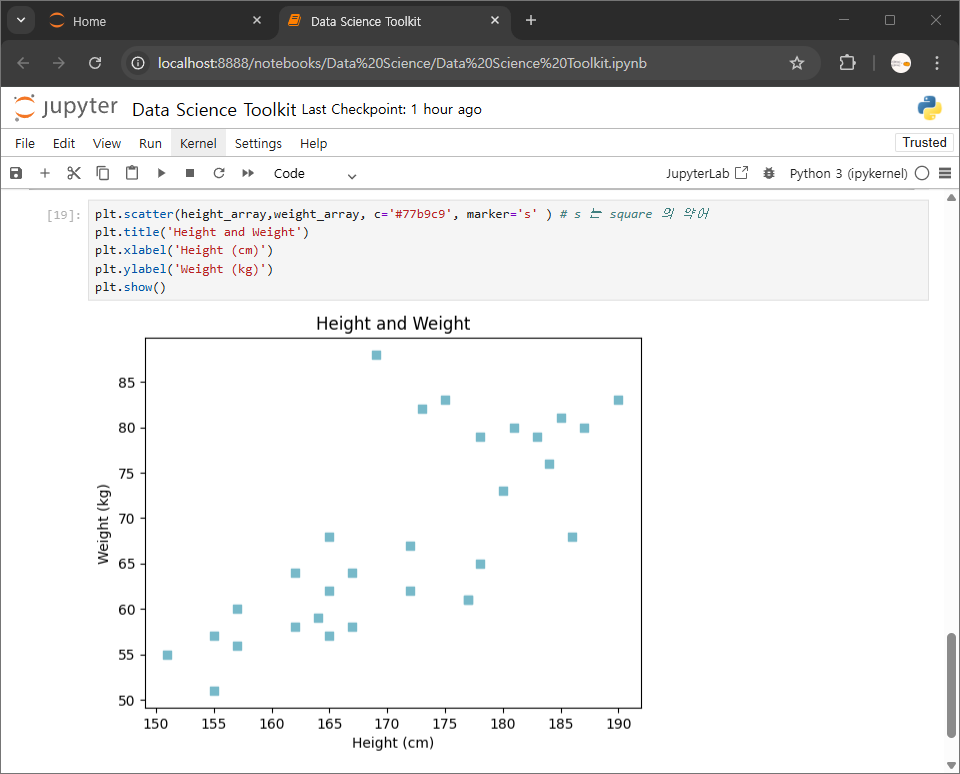
다양한 marker 옵션 알아보기
https://matplotlib.org/stable/api/markers_api.html#module-matplotlib.markers
matplotlib.markers — Matplotlib 3.10.6 documentation
matplotlib.markers Functions to handle markers; used by the marker functionality of plot, scatter, and errorbar. All possible markers are defined here: Note that special symbols can be defined via the STIX math font, e.g. "$\u266B$". For an overview over t
matplotlib.org
'Python > Python : Jupyter' 카테고리의 다른 글
| 그래프에 한글로 된 텍스트 넣기 (0) | 2025.09.24 |
|---|---|
| 연봉 데이터 시각화_Jupyter (0) | 2025.09.23 |
| 그래프 사이즈 조절하기 (0) | 2025.09.23 |
| 짝수만 추출하기_Jupyter (0) | 2025.09.23 |
| Window Jupyter 시작하기 (0) | 2025.09.23 |